
Footer & store features
Cookies, age checks & store utilities
Configure the theme’s optional notices and utilities, and test their limitations.
Set it up
- Find the supported Cookies Banner, Age Verification, Inactive tab message, Favicon Cart Count, Shop protect, or Falling snow effect section in your preset.
- Enable only the utilities that serve your store’s needs.
- Replace default text and configure the available display conditions.
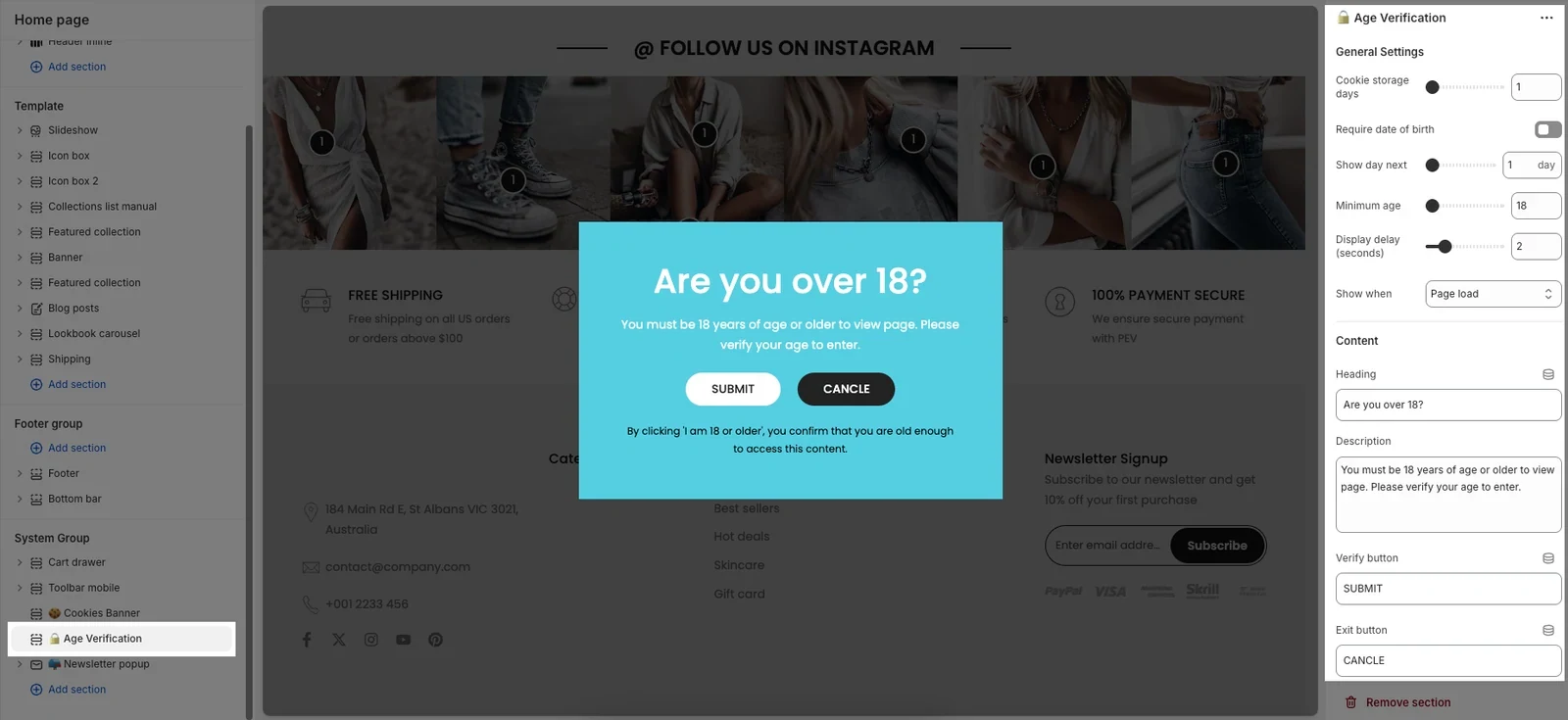
Reference 1. Configure the age-verification content and settings.The4 reference screenshot · Controls and branding may differ in your Zayra release. Select the image to view full size. 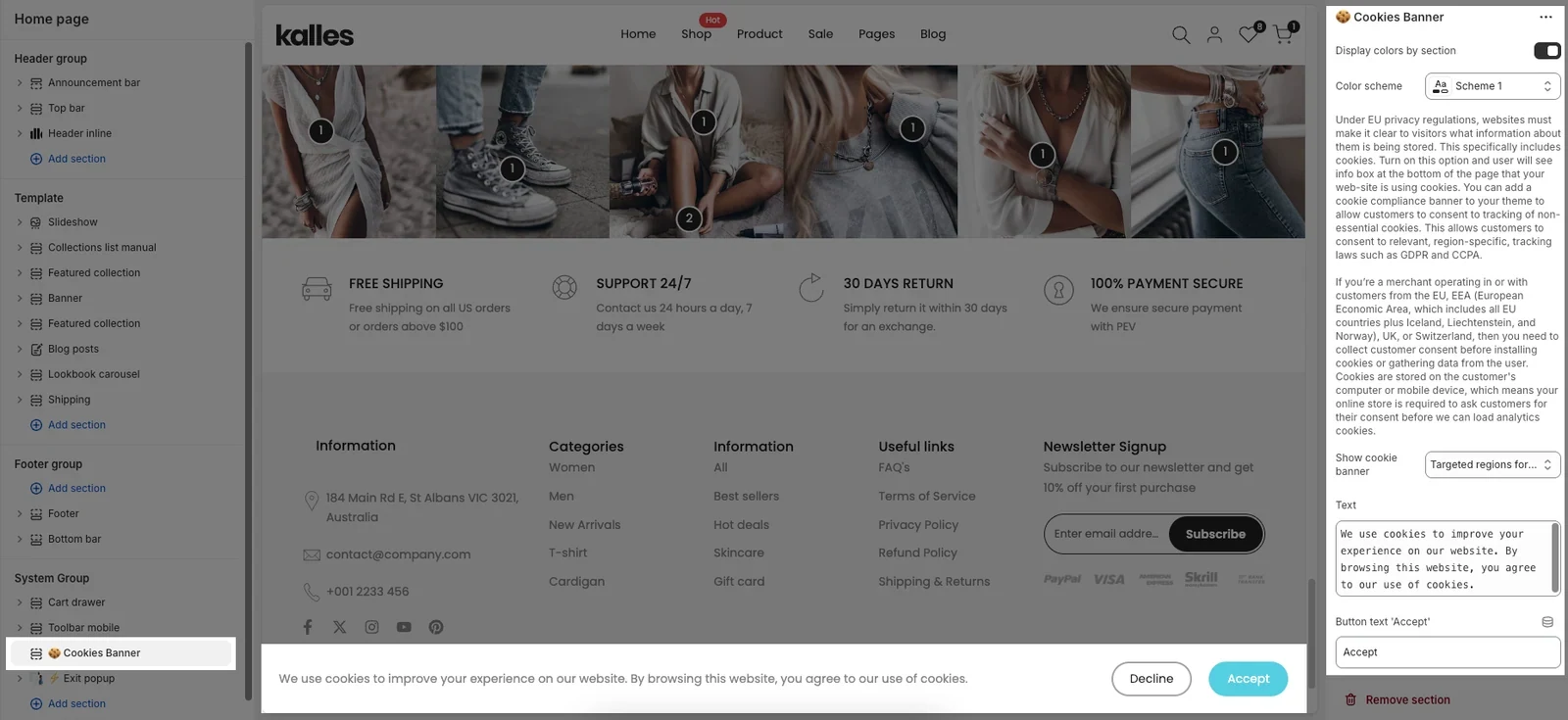
Reference 2. Configure the cookies banner where used.The4 reference screenshot · Controls and branding may differ in your Zayra release. Select the image to view full size. - Save and check first visits, repeat visits, and mobile behavior.
- Review each utility alongside any app offering the same behavior to avoid conflicts.
Check your storefront
- A theme cookie banner is not proof that all tracking scripts honor consent. Configure Shopify and installed apps for the required consent behavior.
- An age popup is a storefront notice, not identity verification.
- Visual shop-protection controls are not a replacement for access control or protection of private data.
Editor controls
Expand a group to see the controls in Zayra 5.4.3. Some options appear only after selecting a related mode or enabling a feature.
🍪 Cookies Banner8 controls
- Display colors by section
- Turn this option on or off.
- Color scheme
- Choose a color scheme configured in Theme settings / Colors.
Shown when its related setting is enabled or selected.
- Show cookie banner
- Options: All region · Targeted regions for limited data collection
- Text
- Add reviewed HTML content for this area.
- Button text 'Accept'
- Enter the text for this field.
- Button text 'Decline'
- Enter the text for this field.
- Button text 'More info'
- Enter the text for this field.
- Link 'More info'
- Choose a destination or enter a complete URL.
🔒 Age Verification14 controls
- Cookie storage days
- Choose a value from 1 to 30, in steps of 1.
- Require date of birth
- Turn this option on or off.
- Show day next
- Choose a value from 1 to 100 day, in steps of 1.
- Minimum age
- Choose a value from 18 to 25, in steps of 1.
- Display delay (seconds)
- Choose a value from 0 to 10, in steps of 1.
- Heading
- Enter the text for this field.
- Description
- Enter the content for this field.
- Verify button
- Enter the text for this field.
- Exit button
- Enter the text for this field.
- Legal text
- Enter the content for this field.
- Background image
- Choose an image from your store’s files.
- Background image (Mobile)
- Choose an image from your store’s files.
- Background overlay
- Choose a value from 0 to 1, in steps of 0.1.
Shown when its related setting is enabled or selected.
- Colors schema
- Choose a color scheme configured in Theme settings / Colors.
⚡ Inactive tab message2 controls
- Message
- Enter the content for this field.
- Delay
- Choose a value from 100 to 5000 ms, in steps of 100.
⚡ Favicon Cart Count5 controls
- Badge background color
- Choose a color.
- Badge text color
- Choose a color.
- Badge type
- Options: Circle · Rectangle
- Badge position
- Options: Up · Down · Left · Upleft
- Badge animation
- Options: None · Slide · Fade · Pop · PopFade
🛡️ Shop protect4 controls
- Disable images copy
- Turn this option on or off.
- Disable images drag & drop
- Turn this option on or off.
- Disable text copy
- Turn this option on or off.
- Disable best selling
- Turn this option on or off.
❄️ Falling snow effect2 controls
- Speed falling snow
- Choose a value from 1 to 50 s, in steps of 1.
- Background opacity
- Choose a value from 0 to 100 %, in steps of 1.
Need a hand with your store?
Contact Inspired Marketing